Why?
I wanted to self-host my site. No more Vercel, and certainly no more increasingly expensive cloud hosting providers. Sadly, AI datacenters have driven hardware prices up the wall, and hosting companies like Hetzner were quick to pass the cost onto us. The goal was to brush up on Kubernetes and have a fun project to kill some time over the weekend.
Hosting is... interesting in university housing. By default, pretty much everything inbound is blocked, and there are some quite specific dorm rules regarding networking. In fact, the housing site threatens to cut internet access to any room that is found to have a wireless broadcasting router. Unmanaged ethernet switches are permissible though, so I decided to go with that.
The Setup
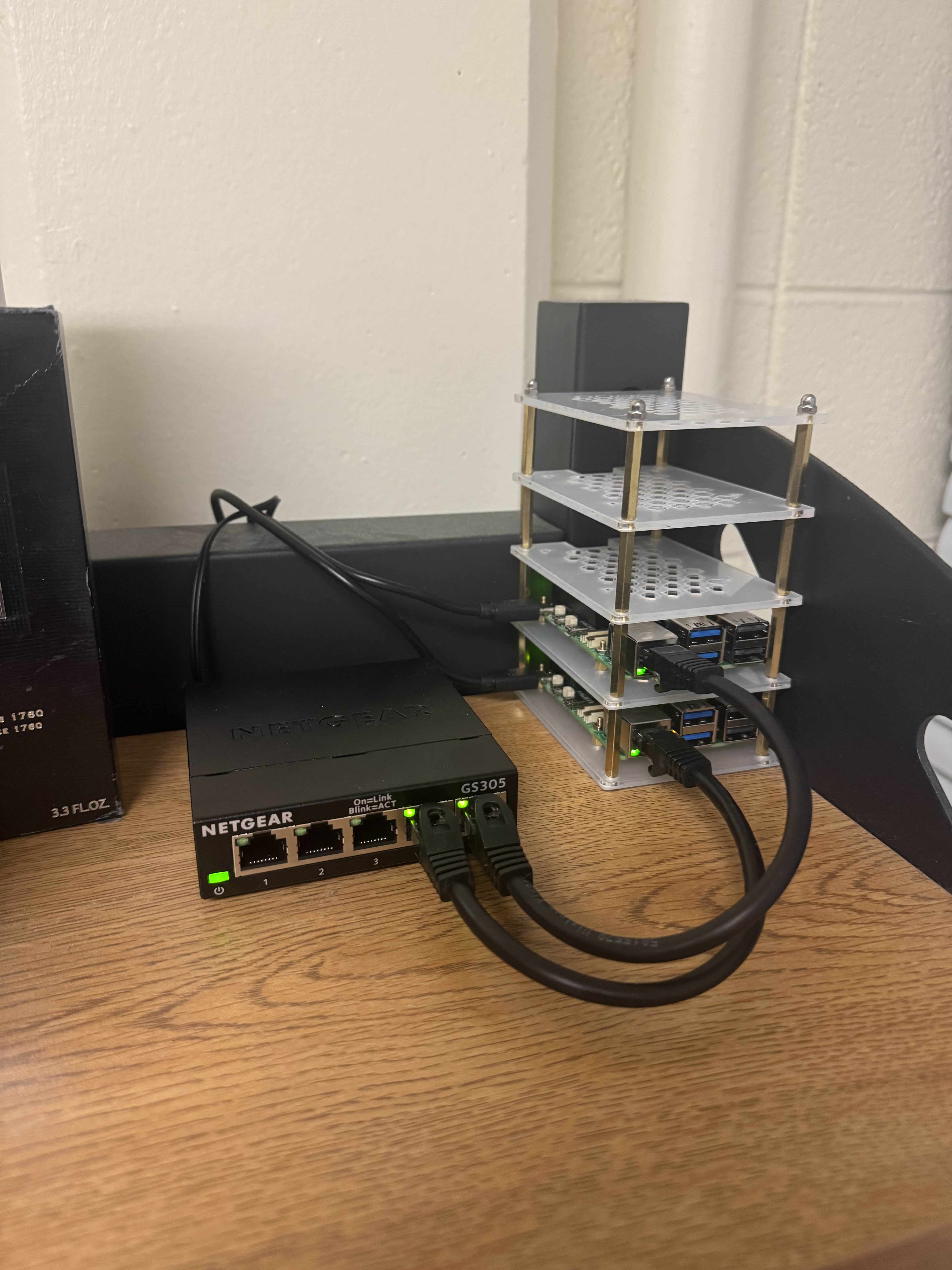
To start, I purchased two Raspberry Pi 5 boards, each with 8GB of RAM. One runs the k3s control plane (server node), the other runs as an agent. Both are wired into an unmanaged gigabit switch on my desk. My laptop connects to the same switch for cluster management over a private subnet.
For internet access, each Pi connects to the open network IllinoisNet_Guest over WiFi. I registered their MAC addresses
through the campus device portal, which I became uncomfortably familiar with after struggling to connect my
Dyson air purifier at the beginning of the year.
The full hardware list totaled to about $300: two Pis, power supplies, SD cards, a switch, cables, a mini rack, and cooling.
Networking Pain
I spent the first hour figuring out how networking worked, specifically NetworkManager. I initially tried to follow older tutorials, but Raspberry Pi OS Bookworm seems to have switched from dhcpcd
to NetworkManager, so all the tutorials telling you to edit /etc/dhcpcd.conf are outdated.
The ethernet interface also changed from eth0 to end0 on newer images, except sometimes it's still
eth0 depending on how the kernel enumerates devices. I ended up creating a NetworkManager connection
file with no interface-name specified so it would bind to whatever ethernet interface existed.
I expected to be able to wire the whole switch to the ethernet port in my dorm room, but it turns out a dorm constructed before the Civil Rights Act does not have functional ethernet wiring setup.
In hindsight, I probably did not need the gigabit switch as each Pi comes with a wifi chip, but I preferred the look as well as being able to configure IPs in order to easily SSH into each device. This also allows for airgapped pod running in the future, if I wanted.
k3s
Thankfully, the Kubernetes part was simpler. I've previously worked with k3s, a lightweight Kubernetes distribution, so I decided to roll with it for this case. k3s is great as it is light (under 100MB binary) and also bundles networking, which lets pods communicate across nodes. Otherwise, one would have to setup a CNI plugin, service router, ingress controller, and much more, which is a hassle.
k3s, unsurprisingly, installed in under a minute per node. I simply ran curl | sh on the server, grabbed the join token,
and ran the same script on the agent with the token and server URL.
Though, two things tripped me up:
First, the Pi 5 needs cgroup memory enabled. Without cgroup_memory=1 cgroup_enable=memory in
/boot/firmware/cmdline.txt, k3s fails to start. Second, iptables wasn't installed by default on the
Bookworm image, which k3s needs for service routing.
After that, kubectl get nodes showed both nodes Ready. I copied the kubeconfig to my laptop and
had full cluster control from my terminal.
Deploying
This site is a Next.js app. I wrote a basic Dockerfile to build and containerize the app.
Since Pi runs on ARM64, and my laptop ran on x86, I had to build the container to run on ARM64. This required QEMU emulation through Docker buildx, which
was quite slow. All in all, the build process took an impressive 1000.8s.
The image gets imported into k3s's containerd with k3s ctr images import. I then deploy 2 replicas across both nodes with a simple Deployment manifest and a ClusterIP Service,
because it's necessary to milk every drop of content out of the $300 invested.
Exposing to the Internet
Cloudflare Tunnel saves the day again. Sorry ngrok.
Cloudflared runs as a Kubernetes Deployment inside the cluster. It creates an outbound QUIC connection to Cloudflare's edge, and Cloudflare routes incoming requests back through the tunnel to my blog's ClusterIP Service. The credentials are stored as a Kubernetes Secret, and the tunnel config lives in a ConfigMap.
DNS is a single proxied CNAME record on Cloudflare pointing my domain to the tunnel. HTTPS termination happens at Cloudflare's edge. The connection from Cloudflare to my cluster is over the tunnel, so the campus firewall never sees inbound traffic. The additional benefit of Cloudflare is that I don't have to manage SSL/TLS certificates, which has shown to be a true nightmare with a restrictive firewall (speaking of which, CPS blocks specifically LetsEncrypt but not ZeroSSL).
Was it Worth It
For hosting a static site? No. Vercel is fast and (reasonably) free for small projects such as this site. For learning? Yes. I have my mini Kubernetes cluster up, and now I can run experiments on it!